


THE BOOKING.COM REFER A FRIEND SCHEME IS NO LONGER RUNNING
We had a good run for a few yeas, but Booking.com have shut down the whole scheme!
HOWEVER – here’s another way to get at least £20 off your next stay
If you are a UK resident looking to spend over £10, you can get either £10 or £20 back by booking travel through Quidco between now and 31st March 2020.
As well as Booking.com, Quidco has loads of other major hotel sites such as Expedia, Hotels.com and over 500 other travel sites.
You need to be a new user, or signed out of your Quidco account to see all the terms and conditions.
👉 Spend £100 on travel and get £20 back 👈
👉Spend £10 on anything and get £10 back 👈
What’s more, you’ll also get cashback on top of it.
Full details here!
Hope that helps soothe the Booking.com pain!
Come tell me where you’ve booked and find more money saving tips over on Instagram. I do a free weekly hotline where I find a cheap holiday just for you!
Am I eligible for the reward?
Even if you have booked with Booking.com before, you are still eligible to get this cashback! However, if you have made more than one booking using a referral link (with this one or anyone else’s), you will only be rewarded once. No rewards will be issued for other bookings.
To gain this reward, you must use the referral link to book your accommodation.
How can I claim my reward?
If your reward is being paid to your credit card:
You need to have a Booking.com account. You have to add and register your credit card details for receiving rewards. You will be prompted to do this when booking, however you can also check this by going into ‘Settings’ and checking ‘use this card for my reward payments’.
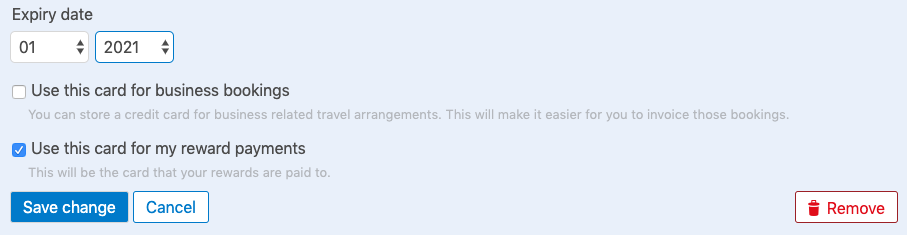
After you return from your stay, Booking.com will put the cash reward on your card. If you don’t have a Booking.com account, you can sign up for one with the same email address you used to book your reservation.
If your reward is being paid out in Wallet credit:
You need to have a Booking.com account. The email address in your account should match the one you used to book. After you return from your stay, Booking.com will add the reward amount to your Wallet.
When will I get my reward?
If your reward is being paid to your credit card:
Once you have returned from your trip, Booking.com will verify the reward and you will receive an email on how to claim it. It can take between 30 and 60 business days for you to receive the reward payment.
If your reward is being paid out in Wallet credit:
Once you have returned from your trip, Booking.com will start the verification process. You will receive an email with more information about the next steps. It can take between 30 and 60 business days for you to receive the reward payment.
How can I check the status of my reward?
Check your reward status or click on ‘My Rewards’ in the dropdown menu.

Then you’ll be able to see how your rewards are processing!

How long is the link valid for?
The link does not expire and it can be used at any time. However, Booking.com has the right to cancel the scheme at any time.
What if I don’t have a credit card to claim my reward?
It’s no problem. You can use a Visa or MasterCard debit card instead and claim in the same way as a credit card.
You can read the full terms and conditions here.
My reward has been rejected. What should I do now?
That sucks!! Unfortunately, I’m unable to access this information so you’ll need to go directly to Booking.com’s Customer Services to raise this issue with them.
What I will say is that tens of thousands of people have used these links successfully, and so as long as you follow all the terms and conditions, you should be fine.
Good luck!
It’s also worth saying that Booking.com isn’t just about hotels, I actually booked our amazing Gdańsk apartment through it as well (though pssst, that link won’t get you the money off!)

You can also see it in the flesh here!
 how many holidays
Is your booking.com is done ? Or still working ?
LikeLike
Still working!
LikeLike
Hi is your link still working? Thanks!
LikeLike
Yes it is!
LikeLiked by 1 person
Hi one more question: If I got a new account with a credit card that was used to receive money from other referred link, is it still eligible to get 25 pounds back? Many thanks.
LikeLike
Hi Xi! It’s my belief that you’re allowed one referral per account. It could be my referral here, or another friends, but you couldn’t have both. However, if you had another account – say with your work email – you could technically use the referral code again. I hope that makes sense!
LikeLike
Hi again, i used your link but it said not eligible. 😦
LikeLike
Polecam mój link na zwrot 15€ za rezerwacje hotelu na Booking.com.
.
https://booking.com/s/61_6/piotrm30
LikeLike
Many thanks for your fast reply! 🙂
LikeLike
Hi! I have done reservation by your link today (guesthouse in Koh Lanta, Thailand). It will cosT HB 658,80 which is around GBP 52. But… in My Rewards/Reward status sections, there is: “Not eligible – Terms and conditions not met”. Have you ani idea why? Anyway, thanks for deal I hope It will work however…
LikeLike
Hi Gos – arghh! Nightmare! Can I ask if you’ve used a referral code before on your account? Doesn’t have to have been mine – could have been anyone else’s at any other time?!
LikeLike
No. I Have never used it. It is a new account. That’s why it is strange…
LikeLike
Hi! I have the same problem. Now I am waiting for answer from booking. Have you an idea about the reason?
LikeLike
So sorry this hasn’t worked for you! Unfortunately, you do need to take this up directly with Booking.com as I have no jurisdiction over what gets approved and why. I’d recommend giving customer.service@booking.com an email, or calling them on their customer services hotline: 0203 564 6725 . Good luck and please let me know if you get this resolved – would love to be able to help others that come across this similar problem. All the best!
LikeLike
And there is an error in my message befoew: It will cost meTHB 2196 which is around GBP 52;)
LikeLike
That’s really odd then. Perhaps it could be a case of the conversion rate making it just under?!! Or not?! I’d advice tweeting @bookingcom and emailing customer.service@booking.com – take screenshots of everything and forward on the costs as well. Good luck!!
LikeLike
Thanks:)
LikeLike
How do you created that link? When i created a link it just gives %10 discount.İf you say me how do you created this one i will use your ref link.
LikeLike
Hi Ali – Booking.com got in touch with me directly so I can’t help, I’m afraid!
LikeLiked by 1 person
Thanks for your answer
LikeLike
fukujitsu1997_Earn 162 euro/day, it’s here>http://moneyflow24.icu/#OIJ70J
LikeLike
Hello! Is it still working?
LikeLike
Yes!
LikeLike
Is it still working???
How many receptions left??
I already used your link but my friends want to use soon!
Plz let me know 😉
LikeLike
Not reception, reservation
Sorry my mistake!
LikeLike
Still working!!
LikeLike
I quess not working now
LikeLike
Hmm – it should be! Let me look into this for you now : )
LikeLike
What did You find?
LikeLike
Where to find more that kind of discounts?
LikeLike
Hi Piotr – it seems that many refer a friend’s have been stopped. I have a contact at Booking.com and will look into this tomorrow to see if this will be going back up / if there will be a different code replacing it. All the best!
LikeLiked by 1 person
Cheers
Btw How to get link as yours to share with others?
Do I have to book a lot?
LikeLike
You used to get one once you booked once that would get your friends £15 or 10% off and then you’d earn £15 however that seems to be gone as well. I got the £25 link because I was part of Booking.com’s influencer programme (though note, I wasn’t making any money per booking!)
LikeLike
still nothing?
LikeLike
Still nothing! In the mean time, this will get you 10% off: https://www.booking.com/s/57_6/bf611c44
LikeLike
Hi there. They have not stopped but if you read the terms and conditions you will realise that you can only refer up to 10 friends and you can earn up to 200€(at least in my country)
LikeLike
Hi Piotr! I think this is up and running again : )
LikeLike
Hi
I used your link for booking but after 3 weeks of verification it is look as transaction been declined. I really don’t know why is that. My booking was over £120
Is this going to be paid as you described in article after 30 days and I should ignore this information?
Regards
LikeLike
Hi Piotr – I’m sorry this hasn’t worked for you! Unfortunately, you do need to take this up directly with Booking.com as I have no jurisdiction over what gets approved and why. I’d recommend giving customer.service@booking.com an email, or calling them on their customer services hotline: 0203 564 6725 . Good luck and please let me know if you get this resolved – would love to be able to help others that come across this similar problem. All the best!
LikeLike
I didn’t met terms and condition but I don’t know what exactly
LikeLike
Hi Piotr. I’m afraid you’ll have to contact booking.com directly to follow up on the terms and conditions. Sorry this is giving you problems!
LikeLike
I’ve been contacted with booking.com by phone and they couldn’t tell me why I did get this reward. They haven’t had any details. Just eligible and nothing else. Is there any other way to resolve this problem
LikeLike
Oops. It’s not working anymore. 😦
Have you talked with Booking.com regarding this?
Thank you so far btw. 🙂
LikeLike
I have – they’re aware – but there’s not been a fix yet unfortunately. I’ll update as soon as there is!!
LikeLike
In the mean time, this link will get you 10% off your booking which may work as a bigger saving if your booking is over £250: https://www.booking.com/s/57_6/bf611c44
LikeLike
I believe it’s working again!
LikeLike
Do you think its still working? Thank you 🙂
LikeLike
I tried to use the link twice with a brand new account (new email), I found the hotel I want but when I submit my credit card details I always get the following error message: “We’re sorry, we seem to have encountered an error when processing your request. To complete your booking, please contact our Customer Service team” (similar to this message: https://prnt.sc/mxwo71). Without using the referral link, booking can be done without any problem.
Does anybody know what that means?
LikeLike
Hi Stasy – I’m sorry this isn’t working for you! This has been a problem before but it did get worked out – let me chase with Booking.com again. In the mean time, this link will get you 10% off your booking: https://www.booking.com/s/57_6/e19d99c5
LikeLike
Hi there – I’ve just tested this on a new account and it went through absolutely fine for me. I suggest trying to book with your new account using incognito/private browsing mode so that there’s no link to your previous account? Let me know how you get on. Thanks!
LikeLike
Hey, I made a booking and it went through fine but now when I’ve checked my rewards it says “Not eligible – Friend already rewarded. You cannot claim a reward because your friend has already received a reward for another booking.” Do you know why?
LikeLike
She has invited more than 10 people already. You can only invite up to 10 friends and earn up to 200€. It does not go on forever.
LikeLike
Hi Livia- I have this set up directly with Booking.com. I actually have never earnt any money from this and it doesn’t matter how many people use it, it keeps on working! Thousands of people have used this code to save money ☺️
LikeLike
Thank you! I’ll get the discount. 😉
LikeLike
Hello chelsea ,
why your link propose 25 pound ?
I am from France and we have referral link but it’s like 15 Euro .
You from Uk ?
LikeLike
Hi Martin! I got sent this code from Booking.com so it’s more than the standard offer. Thanks!
LikeLike
Hi
Does this work if ypu choose the pay at hotel option?
Thanks
Lewis
LikeLike
Hi Lewis! Double check the terms but yes it should – you’ll get it back as cash back on the card you save on your profile within 30 days after your stay.
LikeLike
That’s really nice of you Chelsea.
May I ask you how you created this discount. I’m from a small and poor country, I would like to help them save a little money if possible.
Thank you so much.
Quentin
LikeLike
Hi Quentin! Booking.com set it up for me but once you use it, you should be able to create your own code that gives others 10% off (and you will earn money back yourself). As I did it through a company a while back, I don’t earn anything from the clicks I get but happy to help people save! This code should help people from all counties as well ☺️
LikeLike
Hi,
Is the £15 and £25 links still work?
Thanks!
Idan
LikeLike
They do!
LikeLike
They do!
LikeLike
Hello Chelsea!
Is this link still working:
https://www.booking.com/s/57_6/bf611c44 ?
Or which oe should i use otherwise? Need the 10% back…
Thank you! 🙂
Best regards,
Szilvia
LikeLike
Both still working!
LikeLike
Great! 🙂 And thanks for the quick reply. Just booked for november, so we still need to wait for the reward. I hope it will really work.
Hey one question… I had a referral link too and now it says its invalid. Any idea?
LikeLike
Yes – sometimes happens with mine too! I find they change the terms now and again, but then it usually starts working again soon after. Just keep checking!
LikeLike
Thanks 🙂 Lets see.
LikeLike
Is it still working?
LikeLike
Sure is!
LikeLike
Booking has changed their conditions for 15GBP reward now they ask for 100GBP minimum spend
LikeLike
Indeed they have! Have deleted that one until I work out now best that works. Thanks for the update, Alex!
LikeLike
Hey Chelsea,
Can I use each code once or is use one once and not use the other? Thanks 🙂
LikeLike
Hi Daisy! It’s just one code per account unfortunately!!
LikeLike
No problem! Going to London for 2 nights- do you think it will work if i make two accounts with the same code and book one night with the £25 code per account?
LikeLike
No problem! Going to London for 2 nights- do you think it will work if i make two accounts with the same code and book one night with the £25 code per account?
LikeLike
Technically, yes. But I’m not sure how good their systems are at flagging duplication and therefore couldn’t promise the second one would go through. But if you were travelling with someone, they could book the second night with their account?
LikeLike
Good idea, thanks 🙂
LikeLike
Just used the £25 one, brilliant thanks Chelsea!
LikeLike
No worries Lisa!!
LikeLike
So it said before that howmanyholidays had referred me and said £25 reward when I check out, now that’s gone ☹️ should I contact booking.com?
Obviously I’ll still be going but the £25 was a nice little bonus x
LikeLike
Hi Lisa! Have you checked on your account? If you go to ‘my rewards’ there should be a ‘Refer a Friend rewards’ and under ‘Friends who have referred you’ there should be me! Does it detail that there?
LikeLiked by 1 person
It did, and it said howmanyholidays next to it, but now it’s disappeared
LikeLike
Oh what?!!! That’s really odd as even if it gets declined it normally shows. Just checking, are signed in to the same account and not on another? Definitely contact customer service as that seems very weird.
LikeLike
Hello, is it still working? How many slots do you have left in your §25 discount?
LikeLike
It is! I have unlimited spots – booking.com set it up for me (but don’t worry, I’m not earning from any of the bookings!!)
LikeLike
Hi,
I used your reference link to book a hotel (for AUD 179) last week and took the accommodation last weekend. In the booking process, I was told that I would be given AUD45 back.
However. so far I did not receive any confirmation email about AUD45 back. Is there anything wrong?
LikeLike
Hey! Log onto your booking.com account and you should see the status under ‘My Rewards’. It normally takes between 30-60 days to come through so you’re all on track!
LikeLike
Booking confirmation shows that i will get 25 gbp after my stay. But under my rewards doesm’t show your name and reward amount at referring area. There is just “–” symbol.
LikeLike
Hmmm… Maybe wait a few days as it might be pending but any problems and you’ll have to report it straight to the booking.com customer service team which from a quick google is on tel:+44-20-3564-6725. Good luck!
LikeLike
Hi, I used your link and have stayed and waiting for the reward.
At the beginning, “My Reward” section shows that the reward is on process, but few days ago (until now), “My Reward” section is blank, without any reward at all.
Do you know what’s wrong?
Thanks.
LikeLike
Hi Siva! That sounds like something has gone wrong there. You will need to take it up directly with Booking.com’s customer services as unfortunately only they can explain/rectify this problem. In the UK, the number is: tel:+44-20-3564-6725
LikeLike
Thank you for sharing this 🙂 You just helped me out with a booking. Hopefully it all goes through OK. Keep up the great efforts! 🙂
LikeLike
So glad to hear it, Dale!! Fingers crossed it all works out for you.
LikeLike
Hi there, thanks for sharing the link! Do you know if this only works when you set up a new account or will it work if I use my existing booking.com account?
LikeLike
It will work with your existing account as long as you haven’t used a refer a friend link before! You can check this under ‘My Rewards’ on your account.
LikeLike
Thanks for your quick response. From the previous comments it looks like maybe the reward hasn’t been working lately…do you know if it is still okay to use?
LikeLike
I get over 100 emails a day to tell me people are getting their rewards so I’m pretty sure it is still working!! As long as Booking.com are noting the £25 reward when you click through (this should pop up straight away) then all is grand. I would suggest taking screenshots and making sure you meet all the terms and conditions as it sounds like they can be very quick to turnover a reward if anything is awry. However, this has link worked for tens of thousands of people already!!
LikeLiked by 1 person
https://www.booking.com/s/how0ma64
This link is not working now
check and reply . Anybody tried now . Pls try and let me now .
For me its not working .
LikeLike
Thanks for notifying! This does happen from time to time – it’s very random but from my last experience, it will be back up and running again soon.
In the meantime, this link will get you 10% off: 10% back – https://www.booking.com/s/11_6/dec80b52
Thanks!
LikeLike
Oops! We’ve encountered an error while processing your request. To complete your booking, please contact our Customer Care at 400 882 2810.
This is the error we get after using this link https://www.booking.com/s/11_6/dec80b52
Any body getting same error ?
LikeLike
Hi Alex! So sorry this isn’t working for you – do you want to give this one a try instead? https://www.booking.com/s/34_6/7f8b4384
Unfortunately, this has happened before with the links and it’s totally random (and therefore very frustrating!!) so let me speak to Booking.com tomorrow and see if I can get this smoothed out.
LikeLiked by 1 person
Hi Alex , İ also having same issue when i try to book with referral links. İts really annoying
LikeLike
Same when I look too! I’m chatting with Booking.com and hoping they can fix it soon!
LikeLike
Same things happened on me , giving error when i try at last reservation page.
LikeLike
İt seems because of booking.com blockage , i have talked to them but they are not aware of stuation , they said some stupid things only
LikeLike
Back up and running!
LikeLike
Back up and running now Antonio!
LikeLike
Dear Mam, This link is also not working .
https://www.booking.com/s/34_6/7f8b4384
“We’re sorry, we seem to have encountered an error when processing your request. To complete your booking, please contact our Customer Service team at 400 882 2810.”
LikeLike
can you provide me the reward link .
LikeLike
Hi
Do you know when 25GBP link will be repaired?
Thank you.
LikeLike
Hopefully soon! I’ve contacted the company who set me up with this code but I haven’t heard back yet. I will chase again next week! This has unfortunately happened once before and it just fixed itself, so hopefully that happens again.
LikeLike
Back up and running!
LikeLike
Just wanted to come back and say that I used this code for a stay on Aug 2nd and just got paid the £25 back today so it does work! Thanks!!
LikeLike
Thanks Megan! So glad it worked for you!
LikeLike
After booking. it is getting cancelled automatically after 2 days . mentioning online fraud detection .
LikeLike
Hi there – so sorry you’ve had this issue! I’ve spoken with Booking.com and they’ve given me a new code that should go through fine: https://www.booking.com/s/a788aa5a
All the best!
LikeLike
Appreciation to my father who informed me
regarding this blog, this website is really amazing.
LikeLike
Thanks so much!!
LikeLike
https://www.booking.com/s/how0ma64 . This link is not working if i book more than 3 friends in 1 PC . My friends name is Ramesh , Sukumar and Ashok . It is automatically cancelled saying online fraud deduction .
LikeLike
Yes, there is a new code now listed on this blog. The code you have there has been deleted from this page as it no longer works. Hope this helps!
LikeLike
10% doesn’t work, can you please update it?
LikeLike
https://www.booking.com/content/referral-faq.en-gb.html
Refer a Friend
Our referral programme will shut down on 15 Oct 2019
What does this mean?
All referral rewards related to bookings made before 15 Oct 2019 will be issued as usual. All the terms and conditions still apply.
If your friend made a booking with your link before 15 Oct 2019, both you and your friend will get a reward. All the terms and conditions still apply.
If your friend makes a booking with your link on or after 15 Oct 2019, 00:00, their booking will be valid but no reward will be issued for you or them.
Terms and conditions
LikeLike
Hi there, the refer a friend scheme will shut down soon, though mine is running until November. At that point, I’ll remove the link from the side. This is a decision made by Booking.com! Sob! But it was good whilst it lasted!!
LikeLike
For everybody it is closed. Regards booking. com team
Netherlands
LikeLike
Hi Winston, this referral link will not close until 30th November 2019. It is still working.
LikeLike
I was curious if you ever thought of changing the layout of your blog?
Its very well written; I love what youve got to say.
But maybe you could a little more in the way of content
so people could connect with it better. Youve got an
awful lot of text for only having one or 2 images.
Maybe you could space it out better?
LikeLike